Headings are used to delineate content titles. The <h1> - <h6> tags define header elements from largest (in size and importance) to smallest.
Code:
    <h1>This is a H1 header</h1>
    <h6>This is a H6 header</h6>
Rendered:
This is a H1 header
This is a H6 header
Paragraphs
Paragraphs are used to insert content blocks of text. The browser adds space before and after the block.
Code:
  <p>This is a paragraph section</p>
  <p>This is another paragraph section</p>
This is a paragraph section
This is another paragraph section
Semantics
Inside of text content you can use some semantic tags to alter the way text is rendered. <em> and <strong> are two examples:
Code:
  <p><em>This is an emphasized paragraph</em></p>
  <p><strong>This is a strong paragraph</strong></p>
This is an emphasized paragraph
This is a strong paragraph
Skill++
You may have seen the
<i>tag, which displays text in italics, just like<em>.Though the default visual result is the same,
<i>is intended for italicized text, like the name of a novel.<em>is intended for words which are emphasized: "You must try it."
Breaks
You can use break statements, <br>, to insert an empty line for some formatting.
Code:
  <p>First paragraph</p>
  <br>
  <p>Second paragraph</p>
First paragraph
Second paragraph
Horizontal Rules
You can use <hr> statements to insert a horizontal line for some formatting.
Code:
  <p>First paragraph</p>
  <hr>
  <p>Second paragraph</p>
Rendered:
First paragraph
Second paragraph
Links
Create links to different resources using the <a> tag.
* Define the location where the link navigates to with the href property.
* The text you put inside of the opening and closing of the <a> tag is the clickable link text.
Code:
<a href="https://www.google.com/">this is what the link says</a>
Images
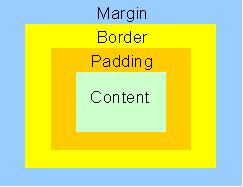
Images can be added to an HTML document with an <img> tag.
* The tag takes a single attribute src that is a path to the image's location.
Code:
<img src="images/box-model.jpg"/>
Rendered:
Lists
List are used to display grouped content.
* Unordered lists, <ul> will render with the classic bulleted style.
* Ordered list, <ol> will display numbered elements.
For both lists, each element is surrounded by the <li> tag.
Unordered List
Code:
  <ul>
    <li>bullet 1</li>
    <li>bullet 2</li>
    <li>bullet 3</li>
  </ul>
Rendered:
- bullet 1
- bullet 2
- bullet 3
Ordered List
Code:
  <ol>
    <li>item 1</li>
    <li>item 2</li>
    <li>item 3</li>
  </ol>
Rendered:
- item 1
- item 2
- item 3